Project
The homelab
A small infrastructure at home, built and documented as if it were the real thing. It is where I try technology before it gets anywhere near production.
The lab is not a shelf of blinking servers. It is the home network, used every day, and it is built to the same standards I hold at work: segmentation, minimal exposure, backups that can be restored and documentation another person can follow. Everything is described in an inventory with a risk register, roadmap, journal and revision history.
Two sketches below. The first shows how the home network is divided, the second how things are reached from the internet. The numbers in the pictures match the list under each picture. Addresses, models, versions and ports are left out on purpose.
The home network
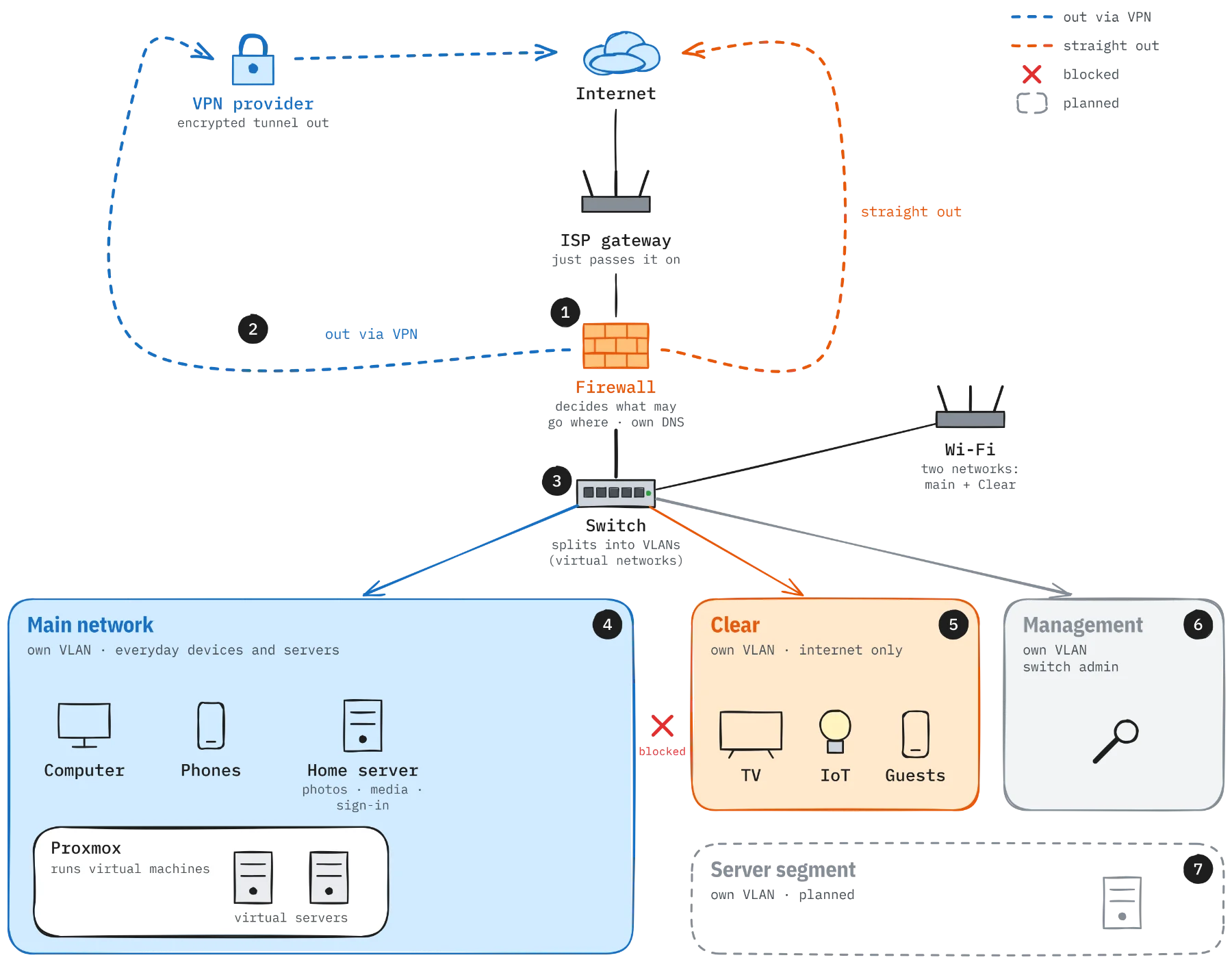
- The firewall sits between the internet and everything else. All traffic passes through it, including between the networks at home, and it decides what may go where. The ISP gateway just passes it on. The firewall is also the home's own DNS server. It checks that answers are genuine (DNSSEC), forwards the queries encrypted (DNS over TLS) so the ISP can't see which sites are looked up, and blocks known ad and tracking domains on the main network.
- VPN by default. Traffic out of the main network goes through an encrypted tunnel to a VPN provider. There are two tunnels, and if one fails the other takes over automatically. Whatever has to bypass the VPN is handled by rules, not by switching protection off.
- VLANs – several networks on the same cables. The switch splits the home into virtual networks, VLANs. They share the same physical equipment but can't talk to each other directly. Everything between them has to go through the firewall, where there is a rule for each thing that is allowed. The Wi-Fi broadcasts two of them: the main network and Clear.
- The main network is where everyday devices and the servers live: computer, phones, a home server running services in Docker (photos, media, sign-in) and a Proxmox host. Proxmox runs virtual servers, where new things can be tried without touching what already works.
- Clear is for TV, IoT gadgets and guests. Traffic there goes straight out to the internet, and nothing from it reaches the main network.
- Management is a small network of its own for administering the switch. It can only be reached from the main network.
- Server segment is the next step. The servers will move from the main network to a segment of their own, so that a compromised server doesn't sit next to everyday devices.
From the outside
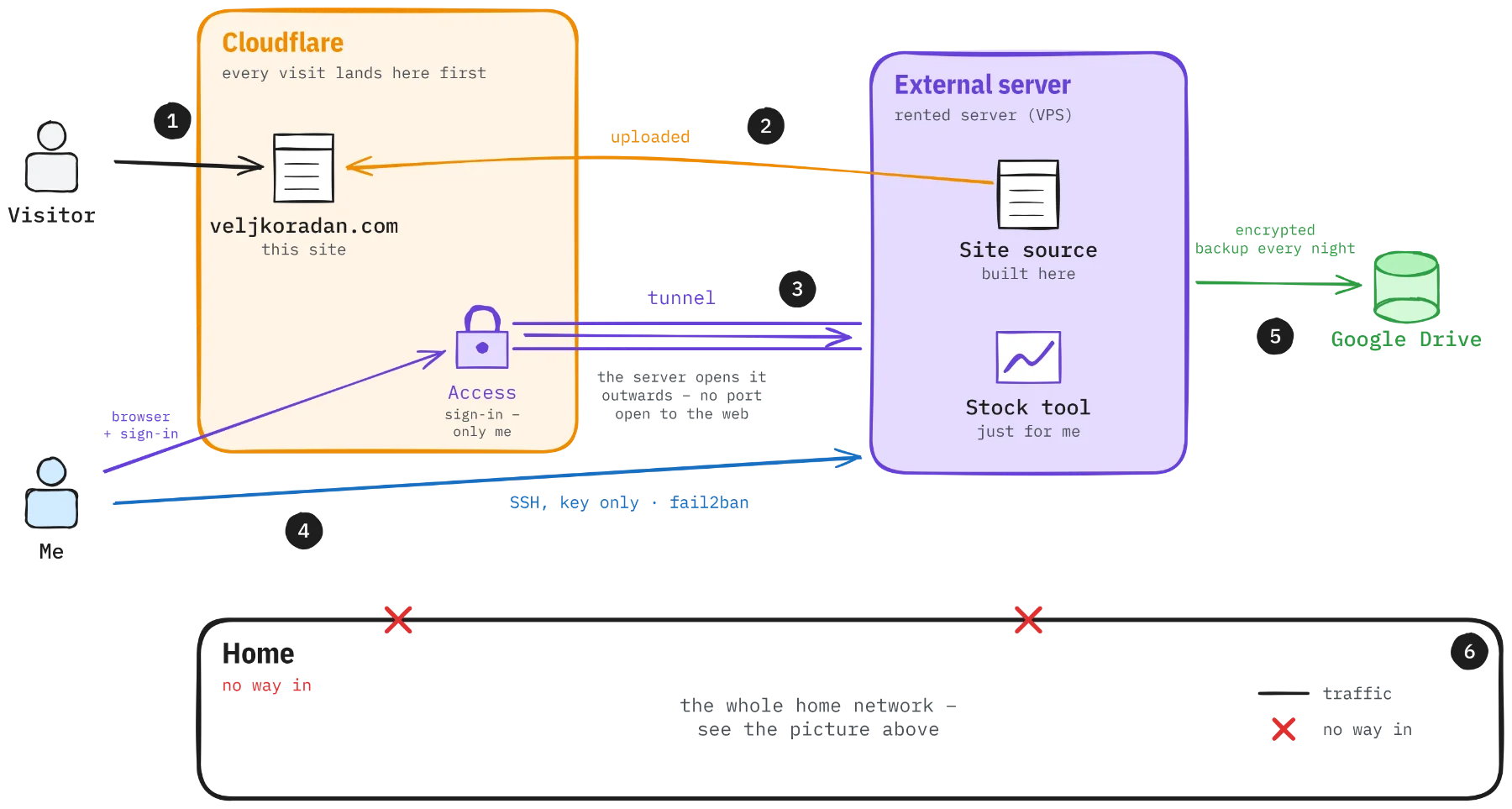
- Visitors only reach Cloudflare. This site is static and lives at Cloudflare, which also runs the domain. No server at home or of mine takes the visits.
- The site is built on a rented server outside the house and uploaded to Cloudflare when something changes.
- The tunnel. The same server runs a stock tool of my own, just for me. The usual way to make a service reachable is to open a port, so anyone can knock. Here it is the other way round: the program
cloudflaredon the server calls Cloudflare itself and keeps an encrypted tunnel open. In front of the tunnel, Cloudflare Access requires sign-in, so everyone except me is stopped at Cloudflare and never reaches the server. - Administration over SSH, key only – a deliberate choice. SSH could also go through the tunnel, leaving the server with no open port at all. But that needs a sign-in via Cloudflare, and on computers behind a corporate zero-trust proxy it doesn't work smoothly, file transfer in particular. So the port is open, but it only accepts keys, never passwords, and anyone trying to guess their way in is banned automatically by fail2ban. It is a trade-off between convenience and exposure that I have made with my eyes open.
- Backup every night. It is encrypted before it leaves the server and stored in Google Drive. Restores have been tested.
- The home has no way in. There are no open ports to the home network and no tunnel in. Everything at home is administered from home.
The firewall as code
The firewall configuration is exported, changed in a copy, reviewed as a diff and restored. Every change can be rolled back.
The toolbox
What is used, what it does in the lab and where the documentation is. Most of it I learned from the vendors' own documentation, which is where the links go.
Network and firewall
OPNsense
Firewall and router.
Router-on-a-stick over a VLAN trunk, rules per segment, policy routing and gateway failover groups. Changes are made to the exported XML, reviewed as a diff and restored.
Documentation – OPNsense- ZY
Zyxel
Managed PoE switch.
Tagged and untagged VLANs per port, a separate management VLAN, SSH off and read-only SNMP.
Documentation – Zyxel UniFi
Wireless access point.
Two SSIDs on separate VLANs, so guests and untrusted devices land in their own segment.
Documentation – UniFiWireGuard
Encrypted tunnels.
Two outbound tunnels from the firewall in a failover group that switches over automatically if the first goes down.
Documentation – WireGuard- VPN
VPN
Internet egress.
Client traffic leaves through a commercial VPN service by default. Services that block VPNs, such as streaming, are routed around it with aliases and rules instead of switching protection off.
DNS and protection
- Ub
Unbound
Local DNS resolver.
DNSSEC validation, DNS-over-TLS upstream, split DNS for internal names and network-wide blocklists for ads and malicious domains.
Documentation – Unbound - Su
Suricata
Intrusion detection.
IDS on the firewall with automatically updated rulesets.
Documentation – Suricata authentik
Single sign-on.
SSO with MFA in front of selected services, through the reverse proxy.
Documentation – authentik
Virtualisation and services
Proxmox VE
Hypervisor.
Runs virtual servers for trying new things without touching what works.
Documentation – Proxmox VEDocker Compose
Container platform.
A stack on a Linux server with one compose file per service, a shared proxy network and restart on failure.
Documentation – Docker ComposeNginx Proxy Manager
Reverse proxy.
One front door for every web service, with TLS and names instead of port numbers.
Documentation – Nginx Proxy ManagerLet's Encrypt
Certificates.
A wildcard certificate renewed automatically through DNS validation, so no ports need opening to prove the domain.
Documentation – Let's EncryptGrafana
Dashboards.
Shows what Prometheus collects, so trends are visible before they become problems.
Documentation – Grafana- PP
PhotoPrism
Photo library.
The whole photo archive with search and metadata. New photos arrive from the phone over WebDAV.
Documentation – PhotoPrism Ubuntu Server
OS for the services host.
Automatic security updates and reboots in a set window.
Documentation – Ubuntu Server
External server and publishing
- VPS
VPS
External cloud server.
Anything that must be reachable from outside lives here, so the home network never has to be opened. Cloud firewall in front.
Debian
OS for the VPS.
Minimal install, services as systemd units with failure alerts.
Documentation – DebianCloudflare Tunnel
Publishing without open ports.
An outbound tunnel to Cloudflare publishes web services without the server accepting inbound web traffic.
Documentation – Cloudflare Tunnel- f2b
fail2ban
Brute-force protection.
Aggressive mode with increasing ban times. Checked against the logs: practically every failed attempt is caught.
Documentation – fail2ban
Backup and secrets
- re
restic
Encrypted backup.
Nightly deduplicated snapshots with 30 days of history and a weekly check that the data can be read. Restores tested, not assumed.
Documentation – restic rclone
Cloud storage.
Backend for restic and nightly copy of the photo library, with a check that every file arrived.
Documentation – rcloneGoogle Drive
Off-site target.
Encrypted repositories and the photo copy. A move to cheaper storage is planned.
Documentation – Google DriveBitwarden
Password manager.
Keys and passwords needed for a restore live here, so the backup can be read even if the server is gone.
Documentation – Bitwarden
Way of working
Claude Code
AI coding agent.
Works in the terminal under permission rules, an audit log and prompt-injection defences. Reads the inventory at every session start and keeps a journal.
Documentation – Claude CodeGit + Markdown
Documentation as code.
Inventory, risk register, roadmap, journal and revision history in text files.
Documentation – Git + Markdown
The AI agent is part of the threat model
Much of the work in the lab I do together with an AI coding agent working in a terminal on the external server. Because it has shell access, the setup has been reviewed for prompt injection and data leakage, and the fixes are in place: explicit permission rules, no access to secrets it doesn't need, and an audit log of the commands it runs. More on the way of working in AI agents in operations.
Why
Most of what I know about segmentation, backup and hardening I learned by doing it. The lab lets me try an idea, watch it break and understand why, without a factory standing still. It also keeps alive the habit I think matters most in operations: writing down what you did, so it can be done again.